First, a quick clarification: objects in databases don’t mean the same thing as objects in object-oriented programming (OOP). In OOP, objects represent code structures that combine attributes (state) and behavior (methods). Database objects, on the other hand, are simply the building blocks inside a database. If you’re not familiar with OOP, don’t worry—it’s not relevant here, and you don’t need it to understand SQL.
Rather than thinking of database objects as abstract programming constructs, it’s often more helpful to compare them to something familiar and concrete. Think about how your computer works. You use folders to organize and store files—and those files can be text documents, images, audio, videos, or spreadsheets. Each file type has its purpose, and individual files have their own unique content.
Databases work in a very similar way. Instead of folders and files, they organize and store objects. These objects come in different types—tables, views, functions, and more—each serving its own role. Just like every file has its own content, every database object has its own definition.
Tables: The Core Building Block
The most ubiquitous type of object is a table, which is where data actually lives. Tables are made up of:
- Columns (fields): each has a name, a data type (like text, number, or date), and rules called constraints.
- Rows (records): each row stores an individual piece of data.
- Some online instructors also refer to records as tuples. In my experience, no one in the real world actually says “tuples”.
SQL statements can interact with both objects (like tables) and records (the rows inside those tables). Depending on what you’re working with, you’ll use different SQL keywords.
| Action (CRUD) | Objects | Records |
|---|---|---|
| Create | CREATE | INSERT |
| Read | SELECT* | SELECT |
| Update | ALTER | UPDATE |
| Delete | DROP | DELETE or TRUNCATE |
*Note, you cannot directly select an object to view its definition. Object definitions are stored in metadata and system tables. Depending on the database platform, you can examine object definitions by selecting records from system views or using provided tools to explore metadata.
Common Database Object Types
Every database platform has its own set of objects, but most include these essentials:
- Schema – a collection of objects inside a database (databases can have multiple schemas).
- Table – a defined set of columns and rows used to store data.
- View – a saved query that displays data but doesn’t actually store it.
- Function – a query that processes data, can take inputs, and returns an output.
- Procedure – a set of query statements that can be run together.
- Trigger – a query that runs automatically when data in a table is inserted, updated, or deleted.
- Constraint – rules that control what kind of data can go into a table.
- Index – an ordered set of one or more columns that helps the database quickly find records.
- Sequence – generates sequences of values, often used when creating new records.
System vs. User Objects
When a database system is first installed, it will contain objects necessary for core operations. This includes system tables used for storing and retrieving data for configuration, query execution, and security. In most database platforms system objects are protected and cannot be accessed by users. You should not attempt to modify or remove system objects, doing so could break critical functionality.
By contrast, user objects is a broad term for any database object defined and maintained by the user. These are the objects you create and can access to view, modify or remove as needed.
Permanent vs. Temporary Objects
Not all objects stick around forever.
- Permanent objects stay in the database until you explicitly remove them with a
DROPstatement. - Temporary objects only exist while your session is open.
A session begins when you open a query window or run a query from a program, and it ends when that window is closed or the query finishes running.
Common examples of temporary objects include variables and temporary tables. These are especially useful in ad hoc queries, functions, and procedures to help filter, organize, or simplify complex logic. Once your session ends, they automatically disappear.
A Visual Analogy
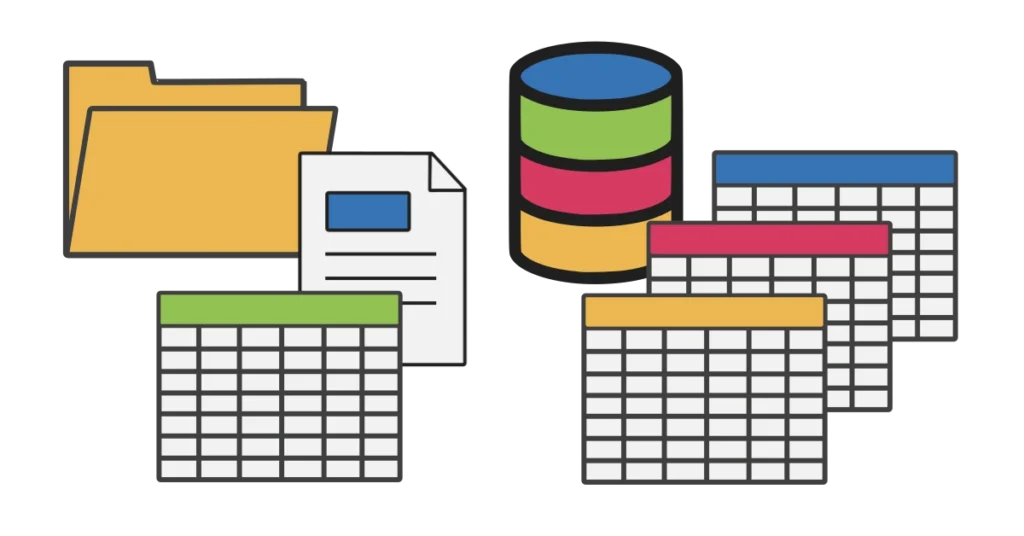
Here’s a way to picture database objects using things you already know from a computer:
- Database → the hard drive directory, e.g.,
C:\orD:\ - Schema → a folder in that directory
- Table → a spreadsheet inside the folder
- View → a saved filter or shortcut to certain rows in the spreadsheet
- Function → a formula that calculates values based on the data
- Procedure → a macro that runs multiple steps at once
- Trigger → an automated action, like a rule that runs when you save or delete a file
- Index → the table of contents that helps you find things faster
This isn’t a perfect comparison, but it helps connect abstract database terms to something more familiar.
Key Takeaway
Database objects are the building blocks that give databases their structure and power. Tables hold the data, procedures and functions help you interact with it, and things like indexes, constraints, and triggers keep everything running smoothly. Once you understand the role of each object, SQL stops feeling abstract and starts making a lot more sense.